
Build with AI agents
Coding agents such as Claude Code, Cursor, Codex, GitHub Copilot and Windsurf already know Supabase well. Since Keel speaks the same APIs, they can build on it too, once they know your server's address and the few ways Keel differs. Paste the prompt below into your agent at the start of a project and it will:
- connect with
@supabase/supabase-jsto your project's API URL and anon key, - read Keel's documentation from your own server (as Markdown made for agents),
- write schema changes as SQL migrations with row level security policies,
- use Auth, Storage, Realtime and Edge Functions the way Keel supports them,
- tell you what to apply, deploy or switch on in Studio.
Get the prompt for your project
The quickest way: in Studio, open Connect and choose the AI agent tab. It shows this prompt with your project's API URL, anon key and server address already filled in. Click Copy and paste it into your agent.
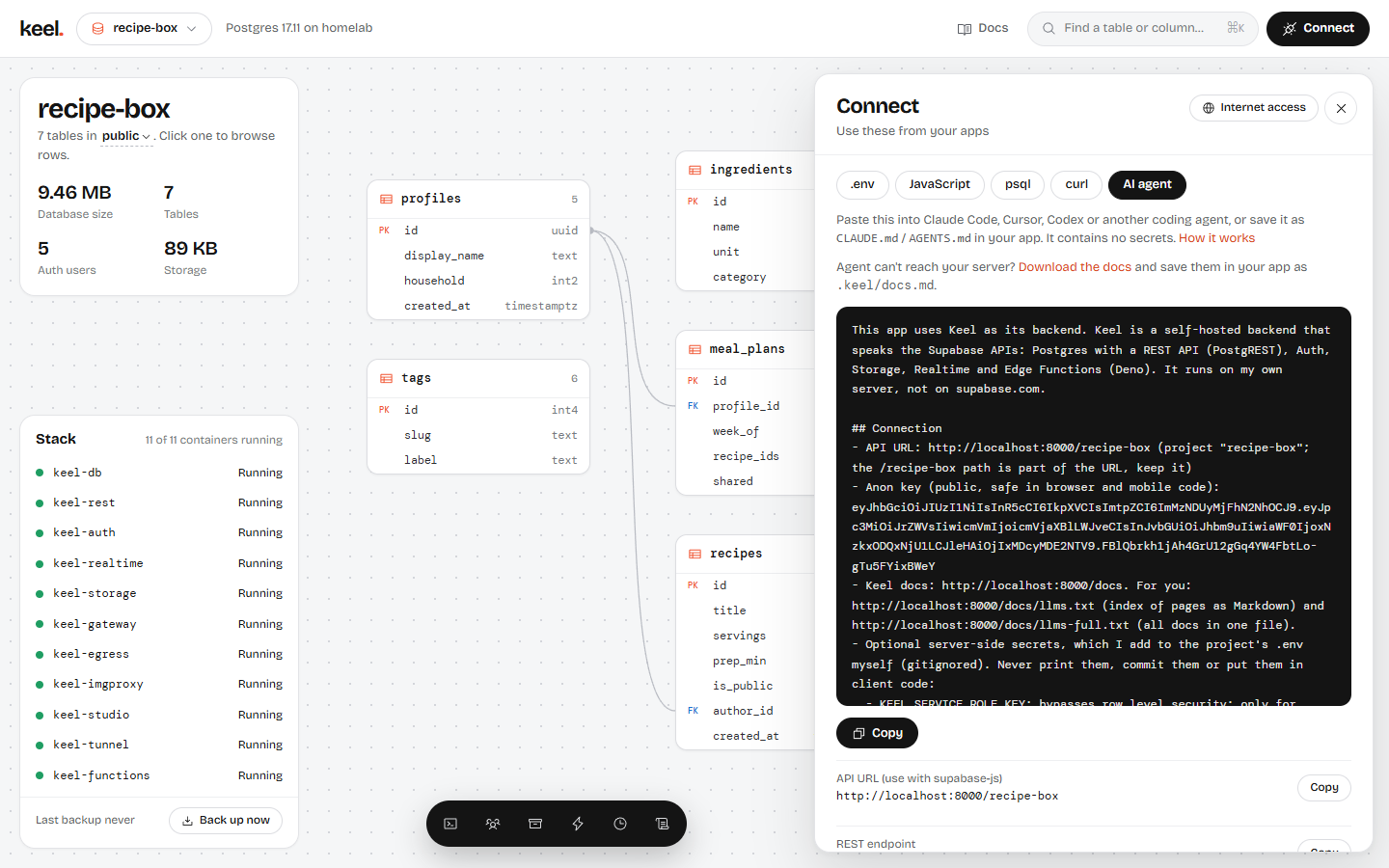
To write it by hand, copy the template and replace YOUR-SERVER (your server's address, for example 192.168.1.20), my-app and my_app (your project and its database name) and YOUR_ANON_KEY:
This app uses Keel as its backend. Keel is a self-hosted backend that speaks the Supabase APIs: Postgres with a REST API (PostgREST), Auth, Storage, Realtime and Edge Functions (Deno). It runs on my own server, not on supabase.com.

## Connection
- API URL: http://YOUR-SERVER:8000/my-app (project "my-app"; the /my-app path is part of the URL, keep it)
- Anon key (public, safe in browser and mobile code): YOUR_ANON_KEY
- Keel docs: http://YOUR-SERVER:8000/docs. For you: http://YOUR-SERVER:8000/docs/llms.txt (index of pages as Markdown) and http://YOUR-SERVER:8000/docs/llms-full.txt (all docs in one file).
- Optional server-side secrets, which I add to the project's .env myself (gitignored). Never print them, commit them or put them in client code:
  - KEEL_SERVICE_ROLE_KEY: bypasses row level security; only for server code, scripts and edge functions.
  - KEEL_DB_URL=postgresql://my_app_owner:PASSWORD@YOUR-SERVER:5432/my_app?sslmode=require: the project's owner role, for migrations, type generation and deploying functions. It owns the public schema and can change auth, storage and realtime data, but isn't a superuser.

## Before writing code
Download the docs once (for example `mkdir -p .keel && curl -s http://YOUR-SERVER:8000/docs/llms-full.txt -o .keel/docs.md`, and add .keel/ to .gitignore) and read the sections you need. If you can't reach the server, ask me to save that file into the project. Supabase guides and examples apply unless the Keel docs say otherwise. Use the API URL above wherever they use https://<ref>.supabase.co.

## Rules
1. Client: @supabase/supabase-js v2, `createClient(KEEL_URL, KEEL_ANON_KEY)`, with both values read from env vars (VITE_/NEXT_PUBLIC_/EXPO_PUBLIC_ prefixes as the framework needs). Flutter, Swift, Kotlin and Python Supabase clients take the same values.
2. Schema: write every change as a SQL migration file in supabase/migrations/ (named <timestamp>_<name>.sql) and apply it with `psql "$KEEL_DB_URL" -v ON_ERROR_STOP=1 -f <file>`. Without psql, use `docker run --rm -i postgres:17-alpine psql "$KEEL_DB_URL" -v ON_ERROR_STOP=1 < <file>`. (Inside `docker run`, a localhost address means the container itself: if Keel runs on this machine, use host.docker.internal on macOS and Windows, or add --network host on Linux.) Without KEEL_DB_URL, give me the SQL to run in Keel Studio's SQL editor. Don't use Supabase cloud commands (supabase link, supabase db push, supabase functions deploy): there is no Supabase project.
3. Row level security is switched on automatically for every new table in the public schema. With no policy, the anon key and signed-in users can't read or write the table. Add policies in the same migration (auth.uid(), auth.jwt(), roles anon and authenticated). Only the service role key bypasses RLS.
4. Auth: keel.auth supports email and password, magic links and email codes, phone SMS codes, OAuth with GitHub, Google, Discord, GitLab and Microsoft (provider 'azure') or an OpenID Connect provider I add (provider 'custom:<id>'), anonymous sign-in and MFA (TOTP and phone, aal2 in the JWT). Keep per-user data in public tables keyed by auth.users(id). Create rows for new users with a security definer trigger on auth.users. Sign-in methods, OAuth keys, SMTP and SMS providers are set by me in Studio (Users > Sign-in settings): tell me what to turn on.
5. Storage: keel.storage. Create buckets in a migration (`insert into storage.buckets (id, name, public) values (...)`) and write policies on storage.objects, for example `(storage.foldername(name))[1] = auth.uid()::text` for per-user folders. Resumable (TUS) uploads and image transforms are available.
6. Realtime: `keel.channel(...)` with postgres_changes, broadcast and presence. A table only streams changes after `alter publication supabase_realtime add table <table>;` (add `alter table <table> replica identity full;` to get old rows on update and delete). Use private channels (`config: { private: true }`) with RLS policies on realtime.messages for anything user-specific.
7. Edge functions: TypeScript in supabase/functions/<name>/index.ts using Deno.serve, with shared code in supabase/functions/_shared/. SUPABASE_URL, SUPABASE_ANON_KEY and SUPABASE_SERVICE_ROLE_KEY are set at runtime. A valid JWT is required unless the function is deployed with --no-verify-jwt (use that for webhooks and verify their signatures yourself). Deploy from this project folder with:
   `docker run --rm -e KEEL_DB_URL="$KEEL_DB_URL" -v "$PWD/supabase/functions:/src/functions:ro" ghcr.io/niklan1110/keel:latest fn deploy <name> --project my-app`
   Set function secrets with the same command, replacing `fn deploy <name>` with `secrets set NAME=value`. Without KEEL_DB_URL or Docker, tell me what to deploy: I can paste functions into Studio > Functions.
8. Types: `npx supabase gen types typescript --db-url "$KEEL_DB_URL" --schema public > src/database.types.ts` (needs Docker), then `createClient<Database>(...)`.
9. Also available, as on Supabase: scheduled jobs with pg_cron's API (`cron.schedule`), HTTP requests from SQL and database webhooks with pg_net's API (`net.http_post`, `supabase_functions.http_request` triggers), and the pgvector extension (`create extension if not exists vector with schema extensions`). Put jobs and webhook triggers in migrations; they need the owner role in KEEL_DB_URL. PostGIS is installed too, but I have to enable it once in Studio's SQL editor. Not available in Keel: GraphQL (pg_graphql), Vault, Queues (pgmq), the S3 protocol, SAML/SSO, passkeys, and OAuth providers other than the ones in rule 4 (such as Apple or Slack). Choose an alternative and tell me.
10. Starting data the app needs (categories, plans, example content) goes in a migration with `on conflict do nothing`. Once it's in the database, have me save it as the project's defaults (Studio > Project settings > Defaults > Save current data as defaults), so I can go back to it with Restore defaults.
11. When you finish a change, list for me: migrations to apply, functions to deploy, secrets to set, and Studio settings to change.
The prompt contains no secrets: the anon key is public by design. The service role key and the database password stay in your project's .env, where the agent reads them only if you add them (see Giving the agent server access).
Keep it in your project
Agents forget a pasted prompt when the conversation ends. To make the instructions permanent, save the prompt as the rules file your agent reads at the start of every session:
| Agent | File |
|---|---|
| Claude Code | CLAUDE.md in the project root |
| OpenAI Codex, Jules, Amp, and others that follow the AGENTS.md convention | AGENTS.md in the project root |
| Cursor | .cursor/rules/keel.mdc (or AGENTS.md) |
| GitHub Copilot | .github/copilot-instructions.md |
| Windsurf | .windsurf/rules/keel.md |
| Gemini CLI | GEMINI.md |
If the file already exists, add the prompt as a new section at the end. Commit it with your code so everyone working on the project, people and agents, gets the same instructions.
Documentation for agents
Every Keel server publishes its documentation in plain Markdown next to the website, following the llms.txt convention:
| URL | Contents |
|---|---|
http://YOUR-SERVER:8000/docs/llms.txt | An index: every page with a one-line summary and a link to its Markdown |
http://YOUR-SERVER:8000/docs/llms-full.txt | The whole documentation in one file, for reading in one go |
http://YOUR-SERVER:8000/docs/<page>.md | Any single page as Markdown, for example /docs/auth/mfa.md |
These files are served without a login, like the rest of the docs, and they always match the Keel version you're running. They're on the API's address (port 8000, the same address as your API URL), so an agent that can reach your API can read the docs too; Studio (port 3000) serves the same files.
Agents that run in the cloud (rather than on your computer) can't reach a server on your home network. In that case, download the docs into the project once and point the agent at the file:
mkdir -p .keel && curl -s http://YOUR-SERVER:8000/docs/llms-full.txt -o .keel/docs.mdGiving the agent server access
With only the API URL and anon key, an agent can build your whole front end, and it hands you the SQL and functions to apply yourself. To let it apply migrations and deploy functions on its own, add these to the project's .env (and make sure .env is in .gitignore):
# Server-side only. Never ship these in a browser or app.
KEEL_SERVICE_ROLE_KEY=eyJhbGciOiJIUzI1NiIsInR5cCI6IkpXVCJ9...
KEEL_DB_URL=postgresql://my_app_owner:OWNER_PASSWORD@192.168.1.20:5432/my_app?sslmode=require
You find both in Studio under Connect. The copy button next to Postgres connection copies the connection string with its password.
KEEL_DB_URL connects as the project's owner role, <database>_owner. It owns the project's public schema, so it can apply migrations, generate types and deploy functions, but it isn't a superuser and can't reach other projects or the server itself (see The project owner role). If the agent runs on the Keel server itself, use localhost as the host. From another computer, Postgres must be open to your network (KEEL_DB_BIND=0.0.0.0), and the connection uses TLS; or forward the port over SSH (ssh -L 5432:127.0.0.1:5432 you@server) and use localhost. See Postgres connections.
These are powerful keys
KEEL_DB_URL can read and change everything in its project, including users and files, and the service role key bypasses row level security for its project. Give them to an agent on a development server, or when you review what it runs. Many agents can be set to ask before running a command; keep that on for anything that touches KEEL_DB_URL. The postgres superuser (POSTGRES_PASSWORD in Keel's .env) is for server admins: don't give it to agents.
With KEEL_DB_URL set, the agent can:
Apply migrations:
psql "$KEEL_DB_URL" -v ON_ERROR_STOP=1 -f supabase/migrations/20260101120000_init.sqlGenerate TypeScript types:
npx supabase gen types typescript --db-url "$KEEL_DB_URL" --schema public > src/database.types.tsDeploy edge functions with the Keel image, from the project folder:
bashdocker run --rm -e KEEL_DB_URL="$KEEL_DB_URL" \ -v "$PWD/supabase/functions:/src/functions:ro" \ ghcr.io/niklan1110/keel:latest fn deploy hello --project my-appSet function secrets: the same
docker runline withsecrets set STRIPE_KEY=sk_live_... --project my-appin place offn deploy hello --project my-app.
The docker run lines need Docker on the computer where the agent works and the Keel image (docker pull ghcr.io/niklan1110/keel:latest). They connect to the database at KEEL_DB_URL and do what ./keel functions deploy does on the server. If Keel runs on the same computer, localhost inside the container is the container itself: use host.docker.internal in KEEL_DB_URL on macOS and Windows, or add --network host on Linux.
Tips for working with agents
- Ask for a plan first. "Plan the tables, policies and functions for X, then wait" gives you a chance to catch a missing policy before any code exists.
- Review policies. RLS policies decide who sees what. Read them like you'd read a firewall rule, and ask the agent to explain each one in a sentence.
- Test as a user. Ask the agent to write a small script that signs in as two different test users and checks that each sees only their own rows.
- One migration per change. Small, named migration files are quicker to review and to apply again on a fresh server.
- Keep secrets out of chats. Paste keys into
.env, not into the conversation: whatever you paste is sent to the agent's provider.